About WiFi Heatmap
Note: this is the trial version of WiFi Heatmap Pro (https://play.google.com/store/apps/details?id=com.optivelox.wifiheatmap2), some functions might be limited. For more details about WiFi Heatmap Pro please contact
Note: this is the trial version of
WiFi Heatmap Pro (https://play.google.com/store/apps/details?id=com.optivelox.wifiheatmap2), some functions might be limited. For more details about WiFi Heatmap Pro please contact app@optivelox.com
If you have a home or office wireless network and you want to see exactly what the quality of coverage your Wi-Fi access point provides, you might need a smart wifi analyzer app; WiFi Heatmap will be a big help in your job.
The app can quickly draw a heat map so that you can easily and immediately see where Wi-Fi signal strength is weak.
As WiFi Heatmap features an automatic movement detector; all you are requested to do is walking around with your phone and the app will take care of the measurements.
Note: automatic movement detection requires a smartphone with both accelerometer ad magnetic sensor support, otherwise, only manual scan mode will be available.
If you are worried about electromagnetic pollution in your home, this app will help you to localize the places where you can rest more safely.
WiFi Heatmap features also a set of tools that provide useful information about wireless signal around you and makes this app a powerful Wi-Fi analyzer. The app can work as a channel analyzer for nearby access point, helping you to optimize your own network (by decreasing interferences and increasing speed and stability).
Scanning performance can be significantly increased by using an external SS11 sensor. High speed scans in single channel mode, probe requests detection and no scan throttling issues are some of the features provided by SS11. For more details about SS11 please see http://optivelox.50webs.com/DL_en/ss0x.htm.=
Typical applications
- Determination of the best location for your access points or receiver
- Help in establishing if your network needs additional repeaters or access points
- Help in finding the best Wi-Fi channel for your router
- Mapping of the link speed of your network
- Assessment of electromagnetic pollution caused by Wi-Fi radiations
Features
- WiFi analyzer
- Channel monitor
- History of signal strength
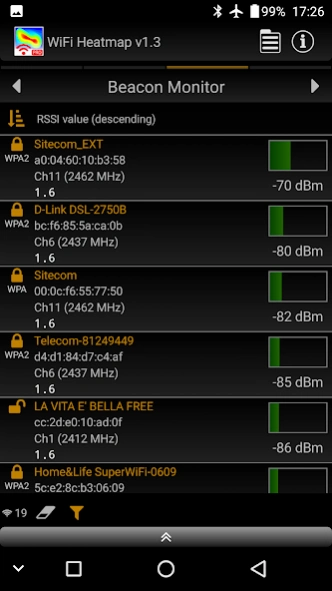
- Beacon monitor
- Probe request monitor (SS11 only)
- HT/VHT channel width detection: 40/80/160MHz, 80+80MHz (Android OS 6+)
- 5GHz support
- Automatic movement detection
- Mapping of signal strength or link speed
- Selectable pseudo color scales
- High order 2D interpolation
- Full pan & pinch zoom
- Projects can be saved in int/ext memory or shared
- User guide included (with Google Translate support)
- Supported languages: en,es,de,fr,it,ru
Previous Versions
Here you can find the changelog of WiFi Heatmap since it was posted on our website on 2021-12-17 06:36:12.
The latest version is 5.0 and it was updated on 2026-10-12 15:46:40. See below the changes in each version.
WiFi Heatmap version 5.0
Updated At: 2026-05-14
Changes: - Updated to Android 15
WiFi Heatmap version 4.0
Updated At: 2024-08-14
Changes: - Updated to Android 14
WiFi Heatmap version 3.0
Updated At: 2023-07-06
Changes: Version 3.0
- Updated to Android 12
- Some minor bugs fixed
WiFi Heatmap version 2.1
Updated At: 2020-08-06
Changes: Version 2.1
- Improved file explorer UI
- Added map smoothness setting
- Fixed MCS bug
Disclaimer
Official Google Play Link
We do not host WiFi Heatmap on our servers. We did not scan it for viruses, adware, spyware or other type of malware. This app is hosted by Google and passed their terms and conditions to be listed there. We recommend caution when installing it.
The Google Play link for WiFi Heatmap is provided to you by apps112.com without any warranties, representations or guarantees of any kind, so access it at your own risk.
If you have questions regarding this particular app contact the publisher directly. For questions about the functionalities of apps112.com contact us.